November 18, 2026 · Daniil Pokrovsky
I decide features in a chat. A worker on another machine builds them.
TL;DR: Hands-on work is deciding what to build with a coding agent: reading code, comparing approaches, and weighing tradeoffs. Background work is building what is already decided, on a worker that runs unattended and opens a pull request. If you could file a task as a ticket for a teammate without a meeting first, it is background work.
I do two very different kinds of work with coding agents, and I treat them differently.
The first kind is where I think. I am working out what the solution should be: I read code, compare approaches, ask what breaks if I take one path, and sometimes throw the whole direction away. I want an interactive session for this, because what I get out of it is a decision, and I am making it as I go.
The second kind starts once I have decided. People often picture this as the boring half, but it is rarely small. A task can still touch dozens of files, change storage, add CLI flags, update docs, go through review rounds, fix CI, and get rebased when main moves. None of that needs me watching. It needs a machine that stays on, its own checkout, and a pull request at the end.
Mixing the two doesn’t work for me. Building inside a thinking session turns a focused hour into four half-finished branches, and a second terminal tab makes my laptop the factory, which stops when I close the lid. So thinking stays with me, and building goes to a worker on another machine.
Hands-on and background work at a glance
| Hands-on work | Background work | |
|---|---|---|
| What you are doing | Deciding the solution | Building a decided solution |
| Output | A decision and a brief | A pull request |
| Needs | You, paying attention | A worker that stays on, with its own checkout |
| Size | Any | Any, from a one-line fix to a multi-step feature |
| Example | Designing task dependencies and splitting them into four steps | Building each of those steps as a queued task |
What counts as background work?
Background work is any coding task whose scope is already decided, whatever its size. I build DevIntern, and much of DevIntern itself is built this way. Each of these user-facing features was decided in a hands-on session and then handed to the worker:
- Handing ad-hoc tasks to the worker, which is the command my assistants use to delegate.
- Task dependencies: queue a task that waits for another one to merge, or builds on top of its branch.
- Running scheduled automations from the dashboard, so I can check a new automation without waiting for its schedule.
- A docs drift automation that looks for features the docs don’t mention yet.
- Resuming tickets an interrupted worker left behind before it picks up new work.
- A reasoning effort setting next to the model choice.
- Workspace-wide pipeline defaults with per-repository overrides.
- Keeping teammates’ open PRs in sync with main.
- Automation health in the dashboard, so I can see which sources are failing.
The sizes vary a lot. What they share is a brief that someone who missed the thinking session could read and know what done looks like.
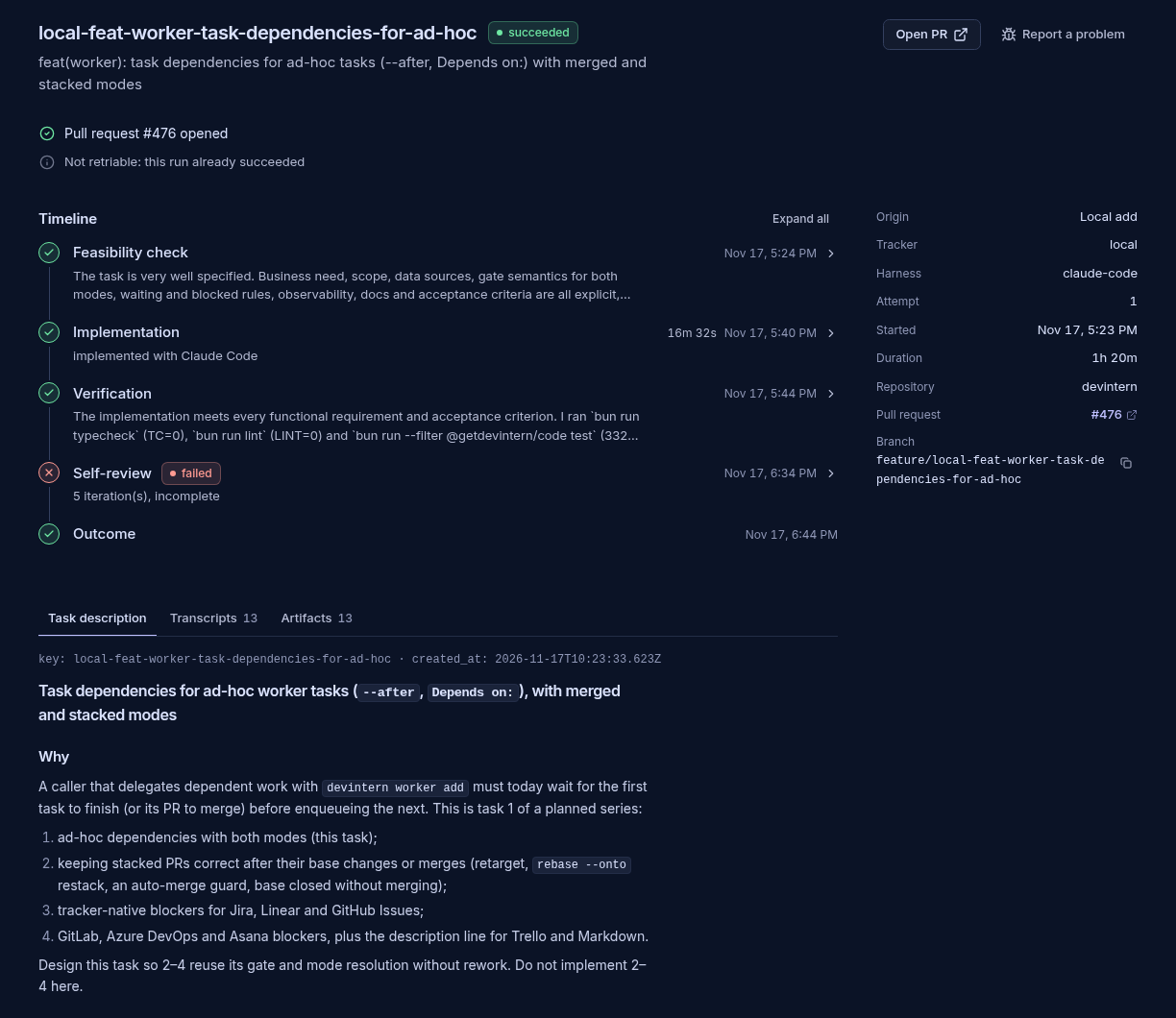
Here is one of them in the worker’s dashboard. The description at the bottom is the brief from the thinking session: why the feature is needed, and that it is step one of a four-step plan. The timeline above it is the background part, with no one watching: a feasibility check, implementation, verification, a self-review, and a pull request. The self-review is marked failed because after five rounds it still flags a gap in how stacked PRs behave once their base merges. That gap is step two of the plan, and the PR says so.
When should a task stay hands-on?
A task should stay hands-on while you are still deciding what the solution is. I keep a task hands-on when the problem is still unclear, when there are real tradeoffs I want to weigh myself, when I am debugging and don’t know the cause yet, or when I am not sure the thing is worth building at all.
I send it to the background when the scope is settled, whatever its size. Background is also where I put independent tasks that can run in parallel, plans with steps that should land in order, and the follow-ups that come up in the middle of something else and would otherwise rot in a notes file.
The test I use: could I file this as a ticket for a teammate without a meeting first? If yes, it goes to the background. If I would want to talk it through, I am still deciding, and it stays with me.
How do you hand off work from Claude or a Grok bot?
You end the conversation by asking the assistant to delegate, and a DevIntern skill writes the brief and queues it on a worker running on another machine. A lot of my thinking happens in a conversation, with Claude on my laptop or with a Grok bot on my phone when I’m away from my desk: what a feature should do, how it fits what already exists, what the first version should leave out. By the end of that conversation I know what I want.
So the conversation is where the hands-on part ends, and it ends with “hand steps one and two to DevIntern.” The assistant writes a brief for each step, queues them on my worker, which runs on a different machine, and I find the pull requests later.
The assistant does this through a skill. It picks the right repository, writes a brief that stands on its own, and makes sure a retry doesn’t queue the same task twice. It also tells me when something shouldn’t be delegated yet, for example when it depends on another task I haven’t ordered.
Two things matter for that handoff:
- The worker has its own checkout. It can’t see anything that exists only where the conversation happened, like an unpushed branch or a log file I was looking at. If a task only makes sense with that local state, I usually haven’t finished deciding it.
- The brief is the whole handoff. If I wouldn’t hand it to a teammate as written, the worker won’t do well with it either.
FAQ
Do background tasks have to be small?
No. Background tasks can be full features with storage changes, new CLI flags, docs, review rounds, and CI fixes. What makes a task background work is that its scope is decided, not its size.
Can Claude or a Grok bot delegate work to DevIntern?
Yes. Any assistant that can use the DevIntern agent skills and run a shell command can queue a task on a DevIntern worker, including Claude Code on a laptop and a Grok bot on a phone.
What should the brief for a background task include?
The brief should say why the change is needed, what done looks like, what is out of scope, and any findings from the hands-on session. The worker uses its own checkout, so anything that exists only on your machine has to be pushed or written into the brief.
Try it
DevIntern is the worker I use for this. It runs on your own machines, picks up tickets from Jira, Linear, GitHub Issues and other trackers or ad-hoc tasks from your assistants, runs Claude Code, Codex, Cursor or OpenCode, and opens pull requests. It follows up when reviewers ask for changes. Interactive runs are free without signing up, and unattended automation starts with a 14-day pilot that needs no credit card.
To let your own assistant hand off work, install the DevIntern agent skills and see Delegate tasks to the worker. The source is on GitHub.