Free 14-day Worker Pilot
Set up your first worker
Your coding agent does the setup from a chat. You install one skill, paste one prompt, and approve the sign-ins only you can do. You finish with a worker running on your own machine, watching your tracker for ready tickets.
14 days of unattended runs · No credit card · No task limit · Sign-in required
What you need
- A repository on GitHub
- Checked out on the machine that will run the worker: a laptop, a VM, or a server.
- Claude Code or Codex
- Installed and signed in on that machine. The worker runs it with your existing subscription or key.
- A task tracker
- Jira, Linear, GitHub Issues, GitLab Issues, Asana, Trello, or Azure DevOps, with permission to create an API token.
- Bun
- The setup skill installs it if it is missing.
The worker can also run Cursor or OpenCode, and GitLab code hosting is supported as experimental. See the worker guide and the GitLab guide.
01
Install the setup skill
Run this in the repository you want the worker to serve. The skill teaches your agent how to install and configure DevIntern. It does not install or start anything by itself.
bunx skills add getdevintern/devintern --skill devintern-setup --agent claude-codebunx skills add getdevintern/devintern --skill devintern-setup --agent codexPrefer a Claude Code plugin, or want the skills for your whole team? See the Agent Skills reference.
02
Ask your agent to set up the worker
Open Claude Code or Codex in the same repository and paste this prompt.
Use the devintern-setup skill to set up a DevIntern worker for this repository.

- Ask me which task tracker to use and which tickets count as ready.
- Use the hosted relay for instant events, and walk me through installing the DevIntern AI GitHub App on this repository.
- Sign me in to start the free Worker Pilot. Do not buy or activate a paid license.
- Install and start the worker service, then show me evidence that it is running and what it is watching.

Stop and ask whenever you need a credential, a sign-in, or a decision from me.
The agent installs the devintern CLI, registers this
repository in a workspace at ~/.devintern, connects your
tracker, validates the ready query, pairs the relay, and installs the worker as a user
service (systemd on Linux, launchd on macOS). It reports what it configured and what it
verified.
03
Approve what only you can
The agent pauses for these. Enter secrets in the terminal or the provider's page, not in the chat.
- Tracker API token
- Lets the worker read ready tickets, move them, and post the PR link back. It is stored in the workspace .env file on your machine.
- GitHub token
- A local GITHUB_TOKEN that the worker uses to open pull requests and read review comments. It is stored on your machine and sent only to GitHub.
- The ready query
- You decide which tickets the worker may pick up, for example one label in one project. Setup validates the query against your tracker before saving it.
- DevIntern sign-in
- A browser sign-in that makes the free Worker Pilot available. No credit card. The 14 days start when the worker is ready to run, not when you create the account.
- DevIntern AI GitHub App
- Setup prints a short-lived link. Open it, pick the repositories the worker serves, and authorize. See below for what the App is for.
Why the GitHub App and the relay
The recommended setup pairs the worker with the hosted DevIntern relay. On GitHub, that pairing goes through the DevIntern AI GitHub App.
- What it does
- GitHub and tracker events reach the worker in seconds instead of on the next poll (about a minute), and @devintern-ai mentions work on any pull request. The worker connects outbound, so there is no public endpoint, open port, or tunnel on your side.
- What passes through it
- References only: the repository, the PR or ticket number, and the event type. Not code, diffs, ticket bodies, comment text, or credentials. The worker then fetches the real content directly from GitHub and your tracker with your local tokens.
- If you skip it
- Polling still picks up ready tickets and review feedback on the worker's own pull requests. Mentions on pull requests the worker did not open will not fire. You can pair later with devintern worker connect.
The App does not replace your token: its private key stays on DevIntern infrastructure and
is used only to receive events, while your local
GITHUB_TOKEN does every read and write. Details are in the
relay guide.
04
Send it a first ticket
Pick one small, well-described ticket and make it match your ready query, for example by
adding the label you chose. The worker moves it to In Progress, works on its own branch in
a managed clone (your checkout is left alone), and opens a pull request for you to review.
Follow the run at
http://localhost:4400.
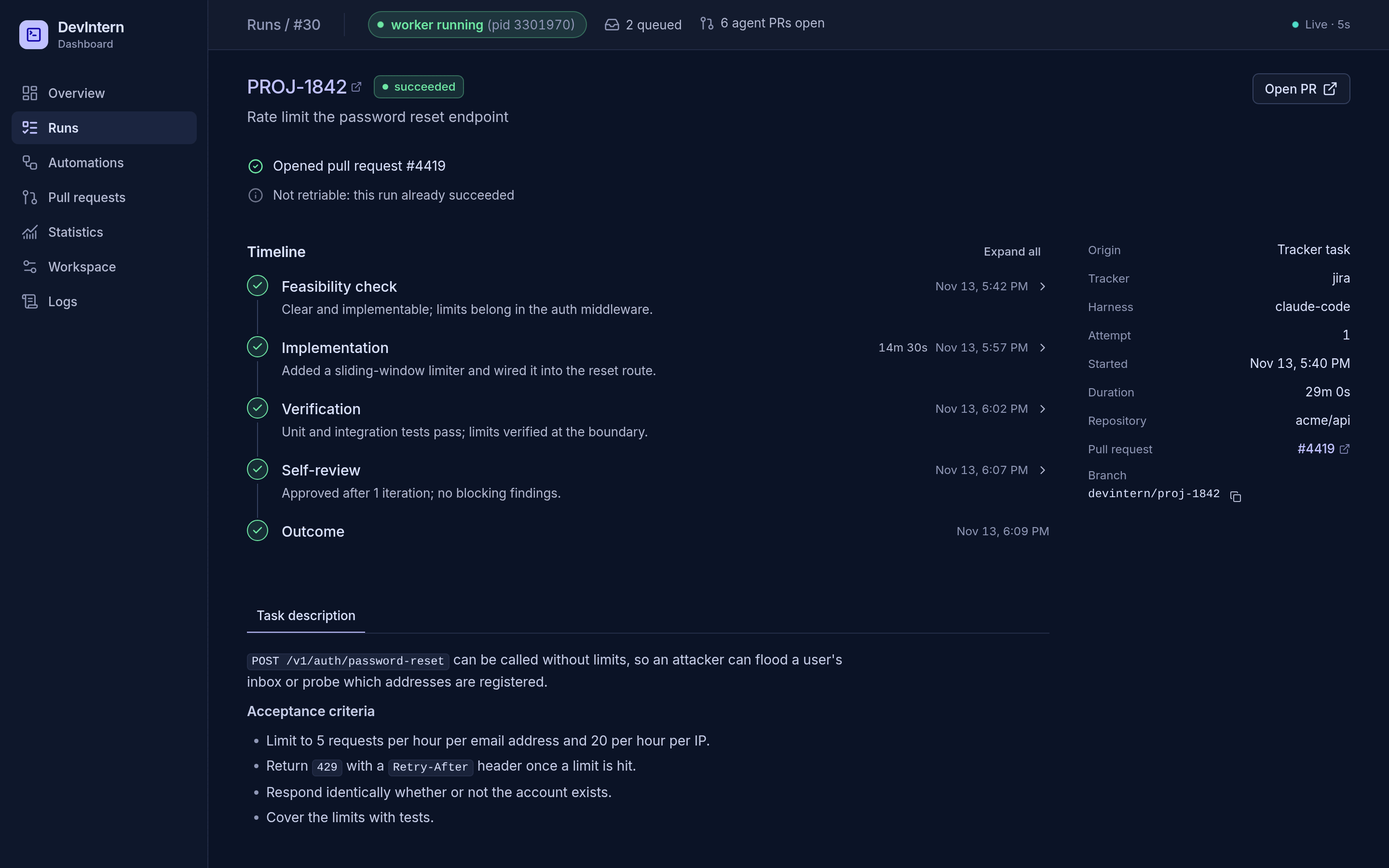
Review comments on that pull request go back to the worker, which pushes follow-up commits. Your team decides what merges.
Prefer the terminal?
The guided wizard asks the same questions in the same order: tracker, ready query, pilot sign-in, relay, GitHub App, and service.
bun install -g @getdevintern/code
cd your-repo
devintern worker init
After the pilot, continued unattended runs need a license. Running the CLI interactively stays free.